
World Community Grid: HTTP file not found
by dervish on Aug.17, 2012, under Uncategorized
Error:
World Community Grid | Scheduler request failed: HTTP file not found
Solution:
Servers are offline for maintenance, etc. Try later..
iPhone 3G Jailbreak/Unlock for T-Mobile
by dervish on Aug.11, 2012, under Hacker, iPhone
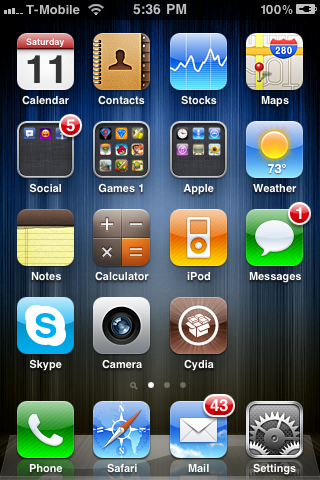
How to jailbreak the iPhone 3G 4.2.1 with baseband 5.15.04 for use with a T-Mobile prepaid SIM.
Obtain T-Mobile SIM
Download the 4.2.1 IPSW Firmware (download)
Download and run redsn0w to jailbreak
– use above IPSW file when requested
– Options: Install Cydia (required), Install iPad baseband (required), Enable homescreen wallpaper (optional)
From Cydia, install UltraSn0w to unlock
Update MMS settings for T-Mobile
Phone should now be on the T-Mobile network with the ability to send text and MMS messages.
Import/recover old SIM contacts (optional)
– Install old/obsolete SIM card
– Go to Settings -> Mail, Contacts, Calendars -> Import SIM Contacts
Change Default Text Editor in Linux Mint/Ubuntu
by dervish on Aug.03, 2012, under Linux, Ubuntu
Command:
$ sudo update-alternatives --config editor
There are 3 choices for the alternative editor (providing /usr/bin/editor).
Selection Path Priority Status
------------------------------------------------------------
* 0 /bin/nano 40 auto mode
1 /bin/ed -100 manual mode
2 /bin/nano 40 manual mode
3 /usr/bin/vim.tiny 10 manual mode
Press enter to keep the current choice[*], or type selection number: 3
update-alternatives: using /usr/bin/vim.tiny to provide /usr/bin/editor (editor) in manual mode.
No support for locale: en_US.utf8
by dervish on Jun.18, 2012, under Linux, Ubuntu
Error:
update-initramfs: Generating /boot/initrd.img-3.0.0-12-generic
Warning: No support for locale: en_US.utf8
Issue:
The problem is that /usr/share/initramfs-tools/hooks/root_locale is expecting to see individual locale directories in /usr/lib/locale, but locale-gen is configured to generate an archive file by default.
Fix:
# locale-gen --purge --no-archive

Generating locales...

  en_AG.UTF-8... done

  en_AU.UTF-8... done

  en_BW.UTF-8... done

  en_CA.UTF-8... done

  en_DK.UTF-8... done

  en_GB.UTF-8... done

  en_HK.UTF-8... done

  en_IE.UTF-8... done

  en_IN.UTF-8... done

  en_NG.UTF-8... done

  en_NZ.UTF-8... done

  en_PH.UTF-8... done

  en_SG.UTF-8... done

  en_US.UTF-8... done

  en_ZA.UTF-8... done

  en_ZM.UTF-8... done

  en_ZW.UTF-8... done

Generation complete.
or
# dpkg-reconfigure locales
Generating locales...
en_AG.UTF-8... done
en_AU.UTF-8... done
en_BW.UTF-8... done
en_CA.UTF-8... done
en_DK.UTF-8... done
en_GB.UTF-8... done
en_HK.UTF-8... done
en_IE.UTF-8... done
en_IN.UTF-8... done
en_NG.UTF-8... done
en_NZ.UTF-8... done
en_PH.UTF-8... done
en_SG.UTF-8... done
en_US.UTF-8... up-to-date
en_ZA.UTF-8... done
en_ZM.UTF-8... done
en_ZW.UTF-8... done
Generation complete.
Google Play Music Couldn’t Play Track Requested
by dervish on May.29, 2012, under Android
Google Play Music
Error Message: “Couldn’t play the track you requested”
Fix: Settings -> Manage applications -> Google Play Music -> Clear data
Clear Data will wipe the corrupted track/database and allow Google Play to re-dowmload the data.
