
Windows
Parallels Windows 11 Pro
by dervish on Jan.26, 2025, under Scripts, Windows
Message: “Your version of Windows has reached the end of service.”
In order to Force Windows 11 24H2 Feature Update, follow the instructions below:
- Open the Local Group Policy via the start menu, or run “gpedit.msc”.
- Expand “Local Computer Policy -> Computer Configuration -> Administrative Templates -> Windows Components -> Windows Update -> Manage updates offered from Windows Update”
- Open “Select the target Feature Update version”
- Set option to “Enabled”
- Set the first field (Which Windows product version would you like to receive feature updates for), to “Windows 11”
- Set the second field “Target Version for Feature Updates” to “24H2”.
- Click Apply, click Ok, and then exit Group Policy Editor.
- Run “gpupdate /force”, or reboot, to force the system to see the settings.
- Check Windows Update for new updates, you should now see the update available.
If gpedit is not installed:
- Use notepad to create a text file with the following and save to Desktop as gpedit-install.bat.
@echo off pushd "%~dp0"dir /b %SystemRoot%\servicing\Packages\Microsoft-Windows-GroupPolicy-ClientTools-Package~*.mum >gpedit-install.txtdir /b %SystemRoot%\servicing\Packages\Microsoft-Windows-GroupPolicy-ClientExtensions-Package~*.mum >>gpedit-install.txtfor /f %%i in ('findstr /i . gpedit-install.txt 2^>nul') do dism /online /norestart /add-package:"%SystemRoot%\servicing\Packages\%%i"pause
- Right click gpedit-install.bat on desktop and click “Runs as administrator” to install gpedit.
- In search field type gpedit.msc and enter to run.
IBM Is Building A Real-Life Version Of #TheMatrix
by dervish on Mar.17, 2016, under Uncategorized

Virtual reality is all the rage at GDC, but it has some limitations. You’ll notice there’s not a lot of online multiplayer, as that would require a magnitude more of processing power. But never say never, especially when you’re IBM.
This Massive VPN Comparison Spreadsheet Helps You Choose the Best for You
by dervish on Mar.14, 2016, under Uncategorized
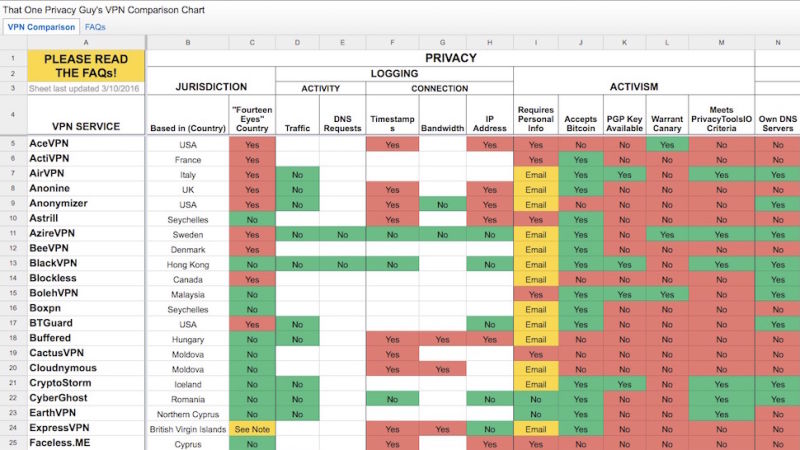
Choosing a trustworthy, reliable VPN service provider is hard, but over on Reddit, user That One Privacy Guy collected virtually everything there is to know about most large (and many small) VPNs and put them into a single color-coded Google Sheet that’s easy to read and understand.
Source: This Massive VPN Comparison Spreadsheet Helps You Choose the Best for You
Let’s Encrypt
by dervish on Mar.12, 2016, under Uncategorized
SSL certificates now provided by Let’s Encrypt.
